
WhatsApp's 24-Hour Rule for Businesses, in Plain English
"Can't I just WhatsApp them from my phone?" It's a fair question. You've got WhatsApp, your customers have got WhatsApp, so why not just message them?
You can. But it depends which version of WhatsApp you're using, because there are three and they work very differently. The rules this post explains (approved templates, the 24-hour reply window and opt-in) apply to the WhatsApp Business API, which Meta calls the WhatsApp Business Platform. That's the version LeadFlow365 systems use. Most owners have never heard of the WhatsApp 24-hour rule for businesses, and it sounds like red tape. Which means a lot of people either avoid WhatsApp altogether, or do it in a way that won't last.
The three versions of WhatsApp
In plain English, they are:
- WhatsApp personal (Messenger). This is the everyday app most people use on their phone. You can't automate follow-up. It isn't set up as a business, so messages come from a personal number and don't look professional. And enquiries sit on one phone, so only whoever is holding it can deal with them. Evenings, weekends, busy days, holidays: if that phone isn't in someone's hand, the enquiry waits.
- WhatsApp Business app. This one is free, and it adds a business profile so customers can see your name, hours and website. WhatsApp says you can use it on up to four linked devices plus the main phone, so a few people in the team can reply. What you still can't do is automate like the API. You get basic greeting and away messages, and quick replies you tap yourself. None of that is joined up to your forms, your CRM or your follow-ups, so an enquiry on your website will not start a WhatsApp on its own.
- WhatsApp Business API. This is Meta's WhatsApp Business Platform, and it's the version we use. It can be fully automated and connected to your CRM and forms. Your team can reply from one shared inbox. And it can send an approved message when someone enquires, in seconds, typically.
If you've been messaging customers from a personal phone, that first option is why it feels fragile. The rest of this post is about the API version, and the rules that come with it.
What the WhatsApp 24-hour rule for businesses actually is
WhatsApp's business rules on the API are there to stop spam. In plain English, there are three you need to know about.
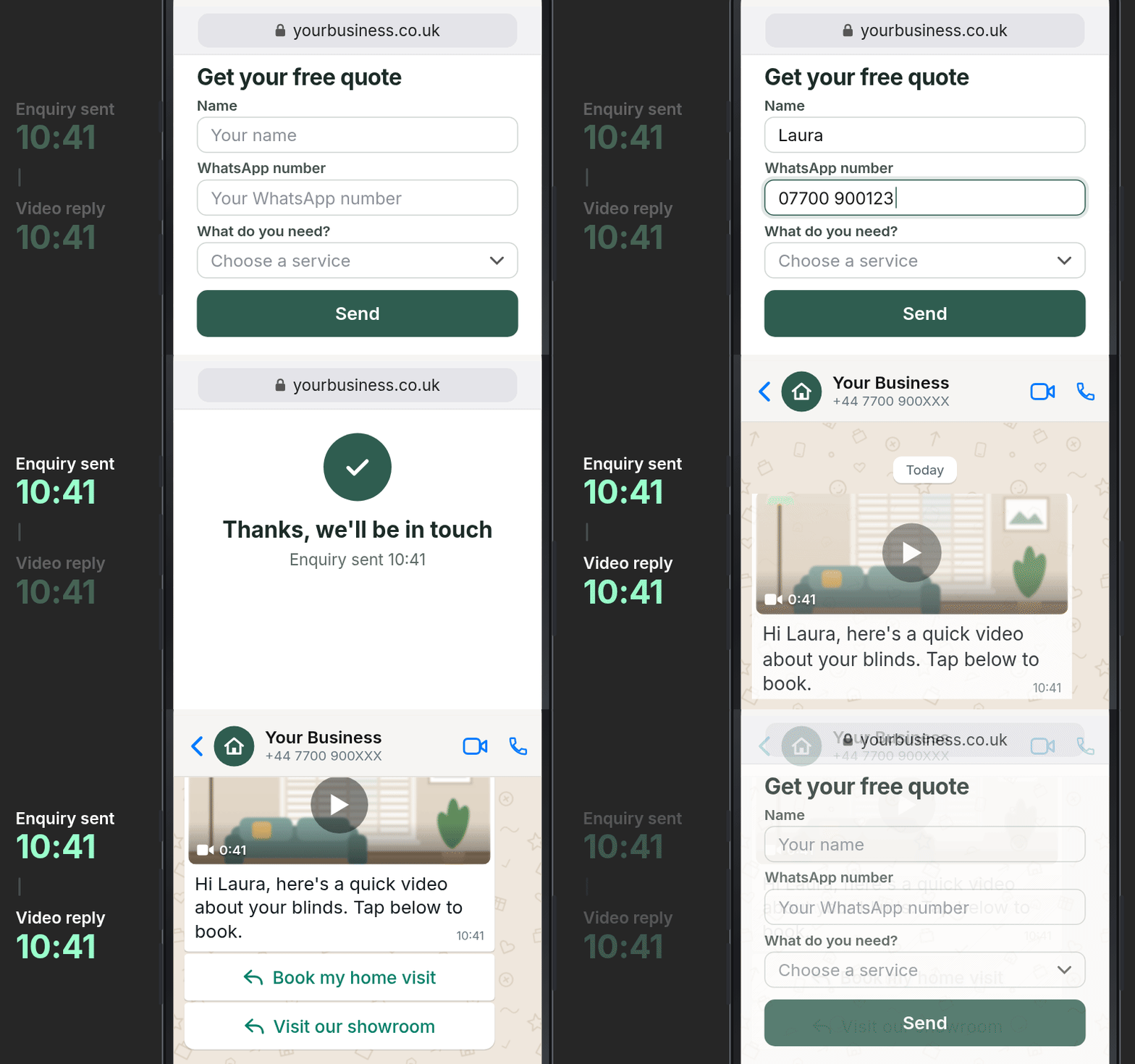
- When you message first, it has to be an approved message. WhatsApp calls this a template. You write it, WhatsApp checks it, and once it's approved you can send it. Think of your welcome message to a new enquiry: "Hi Laura, thanks for getting in touch. Here's a short welcome video about us. Tap below to book."
- When your customer replies, you've got 24 hours to chat freely. Their reply opens what Meta calls a customer service window. Inside it, you can send normal messages, photos, videos and links. Every time they message you again, the 24 hours starts over.
- You can only message people who've said yes. Before you message anyone, they need to have given you their number and said they're happy to hear from your business. The ask has to say clearly who they'll hear from.
Once the 24 hours runs out without a reply, you're back to approved templates only (Meta, WhatsApp Business Platform).
Why the rules make you look more professional, not less
Some owners worry WhatsApp isn't professional enough for a business. The rules are the answer to that.
Messages come from your business, not someone's personal mobile. The customer asked to hear from you, so nothing lands out of the blue. And your first message has been checked before it ever goes out.
WhatsApp also keeps an eye on how people react. Meta rates businesses on things like blocks, reports and mutes. Keep sending stuff people didn't want and your messages can get limited. Send things people are glad to get and you're fine.
So the rules don't get in the way of good follow-up. They get in the way of spam. That's a fair trade. It's also why a WhatsApp from a business they asked to hear from feels nothing like a cold call from a number they don't know. I went into that side of it in Why Your Customers Won't Answer the Phone.
What it means for you
You don't need to know how any of this works behind the scenes. But three things are worth getting right, because they're where the jobs are won.
1. Ask for the OK when they enquire
The easiest time to get a yes is when someone's filling in your form. They want to hear back. A clear line asking if it's OK to contact them on WhatsApp, with your business name on it, does the job. No awkward chasing for permission later.
2. Make the first message worth replying to
Your template is the message that starts it all. A short welcome video about your business, their name, and one easy thing to tap or answer. When they reply, the 24 hours opens up and the conversation can flow. A message that ends with a question gets a reply. A message that just says "thanks for your enquiry" doesn't.
3. Be there when they reply
A reply is a warm lead putting their hand up. If it sits unanswered until tomorrow afternoon, the window's closing and so is their interest. Someone in your team should see it and pick it up while it's still fresh.
Get those three right and the rules work in your favour. More replies, more open conversations, more booked jobs from the enquiries you've already paid for.
How we handle it for you
This isn't a setup job you're left to figure out. We write your templates, get them approved and build them into your follow-up. Meta says review can take up to 24 hours, so we get that done before you go live. We set up your enquiry forms to ask for the OK to message on WhatsApp as part of every build. We keep an eye on your templates once they're running. And when someone replies, the conversation is right there for your team to pick up.
No more worrying if you're doing it right. No more relying on one phone. No more enquiries left waiting. Here's why WhatsApp works for following up leads, and if you want to see the whole journey, from enquiry to booked to reviewed, read Spreadsheets and Sticky Notes: Why Your Enquiries Need a Pipeline.
The rules reward real conversations
You don't need more leads. You need the ones you've already got to hear from you on the app they actually check, in a way that's proper and built to last.
Sounds like a faff? It isn't for you. We handle the paperwork. Book the call.
Free Lead Conversion Strategy Call
Want to see what your missed leads are costing you? Try the Lead Loss Calculator.
This post is Chapter 6 of our WhatsApp Follow-Up Guide, which takes you from why leads go cold to how WhatsApp's rules work in your favour.
Sources: Meta, WhatsApp Business Platform developer documentation: "Service messages" (updated 4 November 2026); "Template fundamentals" (updated 21 May 2026); "Get opt-in for WhatsApp". WhatsApp Help Center: "About WhatsApp Business"; "About linked devices on the WhatsApp Business app" (up to four linked devices and one phone); "How to use greeting messages"; "How to use away messages". Developer documentation checked 16 November 2026; Help Center pages checked 18 November 2026.