
Customers Not Turning Up for Appointments? How to Cut No-Shows
Picture this. You've kept the morning free for a booked appointment. The time comes and the customer isn't there. You ring the number and it goes to voicemail. You send a text and hear nothing back.
If you've had customers not turning up for appointments, you'll know that feeling. It's not just annoying. That slot could have gone to someone who actually wanted it. Which means you've paid for the lead, kept the time free, and still got nothing to show for it.
The good news is that most no-shows can be fixed. Not with more leads, but with what happens between the booking and the appointment.
What customers not turning up for appointments is costing you
A no-show costs you three times over.
- The time. Someone's morning, gone. Time they could have spent with a customer who was actually going to turn up.
- The slot. Somebody else wanted that time. They got told "next week" and might have booked with someone else in the meantime.
- The lead. Most people who don't turn up haven't gone off the idea. Something came up. But if nobody gets back in touch properly, that enquiry you paid for ends up lost and forgotten about.
None of it shows up on a report. It just feels like a bad week. If you want a feel for what your missed leads add up to, put your own numbers into the Lead Loss Calculator.
Why customers don't turn up
Most no-shows aren't people being rude. It usually comes down to one of three things.
- They forgot. They booked it on a Tuesday for a Thursday a fortnight later. Work, kids and everything else got in the way, and it went clean out of their head.
- The reminder went somewhere they don't look. An email lands in an inbox full of junk they check once a week, if that. A call from a number they don't know gets ignored. I went into that in why your customers won't answer the phone.
- Rearranging feels like hassle. To move it, they'd have to ring you, wait for someone to pick up and explain themselves. Not turning up is easier.
So the fix isn't chasing harder. It's making the appointment easy to remember and easy to move.
How to cut no-shows: three things you can start on Monday
1. Confirm it straight away, in writing
As soon as the appointment's booked, send a confirmation. The day, the time, who they'll see and roughly how long it'll take. If they need to have anything ready, say so. A booking made over the phone is easy to forget. One sitting in writing on their phone isn't.
2. Remind them the day before, on the app they actually check
Send a short reminder the day before. Keep it friendly and simple: "Just a reminder we're seeing you tomorrow at 10. See you then." Then send it where it'll be seen. Most people check their messages fast. Feefo found 81% of consumers check their messages within five minutes. A WhatsApp message gets seen while there's still time to do something about it. An email might not get opened until next week.
3. Make rearranging one tap
Give them a one-tap way to rearrange, a reply or a link, on the reminder itself. Someone who can't make it will tap to move it rather than leave you with an empty slot. A rearranged appointment is still an appointment. A no-show is just a wasted morning.
And if someone hasn't confirmed by the afternoon before, that's who your team rings first. Rather than ringing everyone, you only ring the few who've gone quiet.
How we do it
You could do all of that by hand. Most busy offices start off well, then it slips the first week someone's off. So we set it up and run it for you.
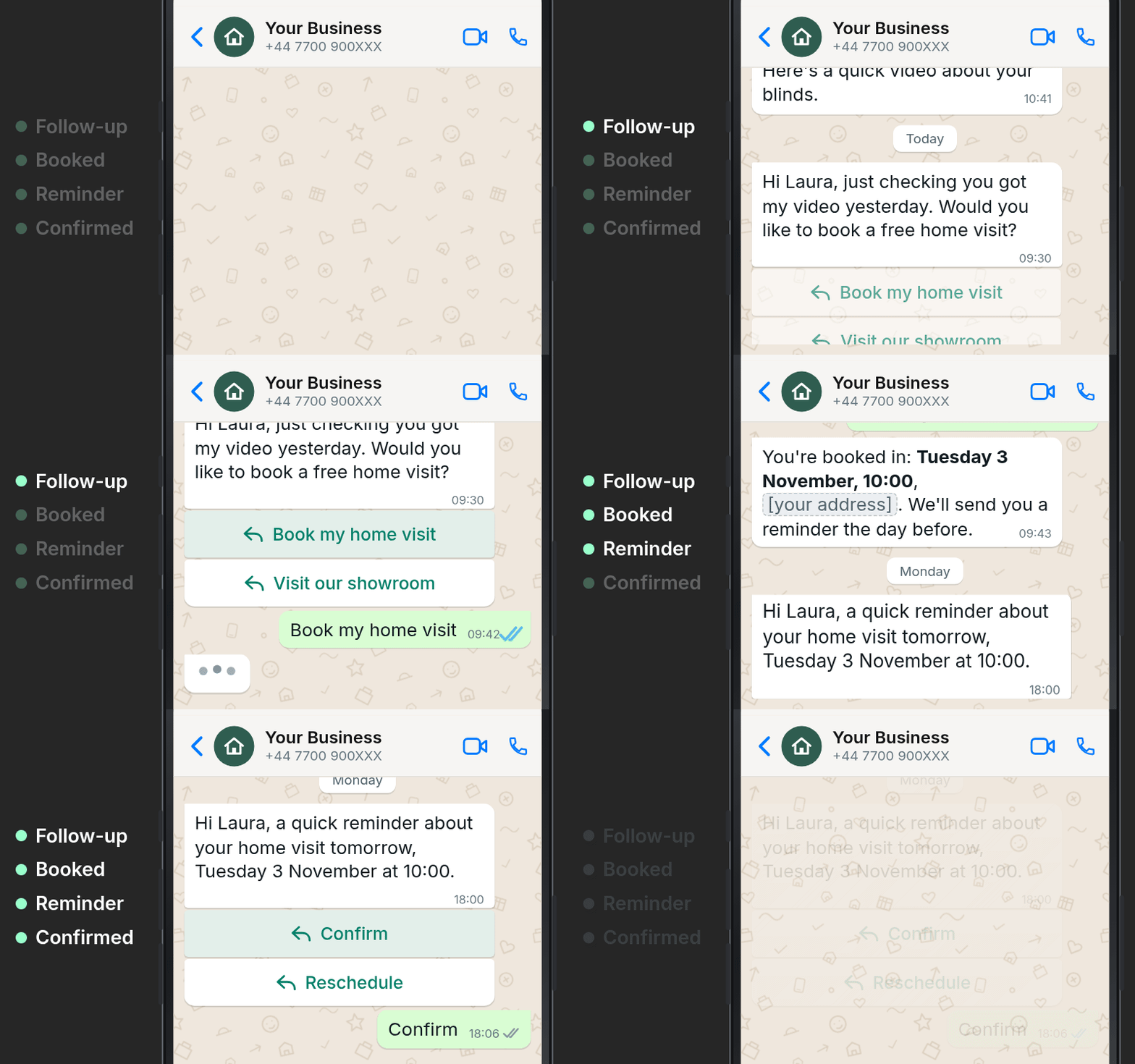
Every appointment booked through the system gets a WhatsApp confirmation straight away and a reminder before the day, with an easy way to confirm or rearrange instead of not turning up. You can see in your pipeline who's booked in, so nobody's guessing. If you're still keeping track on a spreadsheet, here's why your enquiries need a pipeline.
No more wasted mornings. No more empty slots. No more relying on someone remembering to ring round. Here's more on why WhatsApp works for following up leads.
Get the people who book to turn up
You don't need more leads. You need the ones who've already booked to actually be there.
Book the call and see the confirmations and reminders working.
Free Lead Conversion Strategy Call
Want to see what your missed leads are costing you? Try the Lead Loss Calculator.
For the whole journey, from the first reply to the review at the end, read our WhatsApp Follow-Up Guide.
Sources: 81% of consumers check their messages within five minutes. Feefo, June 2026.